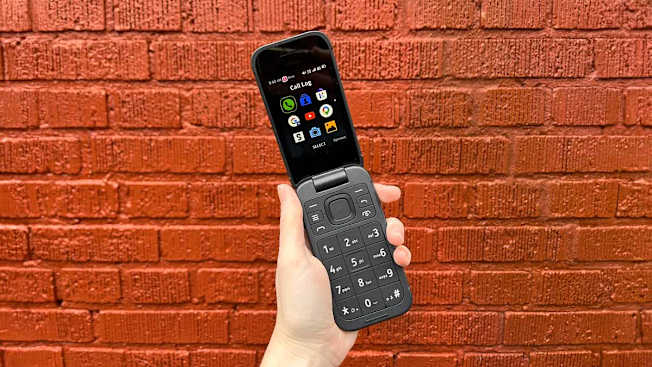
People are ditching their smartphones to reduce their screen time. The basic Nokia 2780 Flip helped me slash mine.
The Nokia 2780 Flip isn’t much fun to use, but that’s the whole point.
By Courtney Lindwall
When I bought the Nokia 2780 Flip—a bare-bones device frequently recommended by “dumb phone” devotees—I wanted it to be bad. Ideally, it would be clunky to hold, tediously slow, and devoid of the kind of compulsively useful features that cause me to fritter away my time.
I wanted to embrace “digital minimalism” by joining the growing number of self-proclaimed smartphone addicts who’ve downgraded their devices in search of a slower, less screen-plagued life.
On the popular r/dumbphones subreddit, thousands of current and prospective dumb phone users compare models, tout their increased attention spans, and share charmingly retro photos of their so-called “everyday carry”—that is, the items they now lug around with them to replace their former do-it-all device, from e-readers to old-school iPods. I wanted in, too.
I wasn’t ready to ditch my iPhone 13 entirely, but I planned to stash it in a drawer for most of the day and rely mainly on the flip phone. For the next week, the Nokia would be my primary device—helping me stay in touch, get around, and manage the logistics of daily life.
In the end, my sturdy-looking Nokia held up its end of the bargain. The phone proved unenticing, ultimately helping me slash my screen time and meaningfully shift my relationship to my device. But navigating the world without a smartphone wasn’t without its trials and tribulations. Here’s what I learned from my temporary iPhone breakup—and what you should know if you want to make a similar switch.
Getting Started
While using a flip phone might be a struggle, the setup is easy. I decided to create a new line for my Nokia so I could return to my iPhone and number as needed—a strategy I recommend if you’re still deciding whether you can hack converting to a flip phone full-time. This way, I could respond to texts sent to my iPhone via iMessage on my laptop, though not as immediately.
For $45, I purchased a new SIM card online that included three months of Mint Mobile service with a new phone number and 5 gigabytes of data per month. (Before choosing a carrier, make sure it supports the flip phone model you plan to use.) I popped off the Nokia’s back, removed the battery, and inserted the SIM card myself. A few minutes and a quick call with Mint’s customer service later, I could call and text with the handful of people I’d shared my new number with.
To reduce the pull of my iPhone, I tucked it away in a drawer for most of the day. I wanted the flip phone to serve its primary role—as a tool for emergencies and time-sensitive communications, like letting a friend know I’m running late. On that front, the Nokia excelled. As a mid-2000s tween, I found that the muscle memory of T9 texting returned quickly, even if it was cumbersome. Calls, too, came through crystal clear.
But aside from those simple functions, I hoped to mostly stay off the device. Instead of having the Nokia stand in for my iPhone, I wanted to embrace a more phone-free life. The whiplash was immediate.
When There’s No App for That
The mother of all pain points was losing access to Apple’s sprawling app store. At seemingly every turn, I wanted to reach for an application that my humble flip phone lacked.
I wanted to call an Uber, Venmo my friend for dinner, and buy e-tickets for my commuter train ride. Restaurant menus had been outsourced to QR codes. Movie tickets at my local theater had to be shown in an app. I cursed the convenience of Apple Pay and the ease of ordering my go-to lunch on Seamless.
Even basic planning felt harder: I missed checking the weather or my upcoming meetings on Google Calendar, both available at a glance from my iPhone’s home screen. At times, I couldn’t find a workaround and had to bend the rules—like when I needed my iPhone to authenticate my work email or connect my Bluetooth sleep headphones at night.
While the Nokia 2780 does offer some apps via the “KaiStore“—Google Maps, YouTube, a news app, some games—they were, as desired, entirely frustrating to use without a touchscreen. (Forget doomscrolling: You can’t even read an entire news headline on the Nokia 2780’s tiny display.)
But as the days away from my iPhone ticked by, these small frictions became less frustrating. I took the extra minute to print paper train tickets from a kiosk at Grand Central. Instead of checking a transit app to see when the next bus would arrive, I simply stood and flexed my patience. Routine tasks that always seemed urgent—sending emails, looking something up, paying a bill—quietly sat until I was at home on my computer, and my life was none the worse for waiting.
More Trade-Offs: Maps, Music, and the Camera
The biggest challenge was breaking the emotional attachment to my smartphone’s navigation. The Nokia 2780 does have a GPS-enabled maps app, but it’s a pain to use. (Notice a theme emerging?) You can move through step-by-step directions in a pinch, but the app doesn’t have turn-by-turn navigation or display the direction you’re facing.
I preferred to jot down directions in a notebook before leaving the house—reminiscent of the MapQuest days. Other dumb phone users report finding creative workarounds, like buying a stand-alone GPS to keep in the car or relying on a smartwatch with built-in GPS that doesn’t require pairing with a smartphone. Some people even hold onto a former smartphone solely for navigation. Even without cell service, you can tether it to your flip phone via hot spot to run GPS.
As someone with a notoriously poor sense of direction, I experienced a lingering anxiety about getting lost, but I also felt better oriented and more self-reliant. One day, unexpected maintenance on a train line forced me to reroute, and, feeling like some intrepid 17th-century explorer, I simply consulted a subway map.
The Nokia 2780 Flip does offer Google Maps (left), but I tried to rely on the old-school option—the posted subway map (right).
Photos: Courtney Lindwall/Consumer Reports
Were there other sticking points? You bet. On a typical day, I rarely allow for silence when commuting or walking the city, usually playing music or podcasts from Spotify. Most flip phones can technically play music, but they don’t make it easy.
On my Nokia 2780, I could theoretically tune in to FM radio (though I couldn’t get the scanner to pick up any stations), play music on YouTube (irritating to search), or upload songs via a microSD card (too much work). Other models, like the Cat S22 Flip, can access streaming apps like Spotify, but the user interface is likely to be a challenge. Embracing the spirit of the experiment, I mostly opted to do without and listened instead to the chatter in my own mind—which, little by little, eventually quieted down.
Also notably missing? A great camera. I’d taken for granted the miracle of today’s smartphone cameras, which can make even hastily snapped shots look professional. I suppose the photos taken with the Nokia 2780’s 5-megapixel camera, though dim and low-res, do have a certain nostalgic charm—like in the photos below of a neighborhood flower stand and a pan of cookies—but it’s a downgrade I wouldn’t want to live with permanently.
These photos, taken with the Nokia 2780 Flip, don’t quite stand up to those taken with my iPhone 13.
Photos: Courtney Lindwall/Consumer Reports
If I were to transition to a flip phone full-time, I’d take a cue from other dumb phone converts and invest in a few pieces of old-school tech, starting with a digital camera and a stand-alone music player. (I have my eye on a pink iPod Nano and a Sony Cyber-shot on eBay.)
Is Switching to a Flip Phone Worth It?
Ultimately, I reaped the rewards. I wrestled back about three hours of my day, judging by my former screen time. No longer a tap away from a food delivery app, I cooked more meals. I read more deliberately—finishing a book, moving through a backlog of magazines, and reading news on my laptop—rather than scrolling endlessly through clickbait headlines and reactionary social media posts.
Truthfully, I sometimes felt bored or lonely. Whether I realized it or not, my iPhone provided a sense of ambient connection and comfort, like the low drone of a television in an empty house. But there was also a calm and clarity that came from fully disengaging with the device that didn’t come with other screen time hacks like grayscale mode or an app-blocking tool like Brick.
Given how challenging the transition to flip-phone life can be, I totally see why it’s not a viable full-time option for many, particularly those who rely on round-the-clock device access for work or communicate with family members through an app like WhatsApp. But I’m here to tell you that you don’t have to make this an all-or-nothing solution to receive the benefits.
My experiment lasted nearly a week, but I now plan to regularly sideline my smartphone and rely on the Nokia whenever I want to be more present. It’s a way to slow down for the weekend or focus when facing a deadline. With my iPhone tucked away, even for a day, my moods and attention are less easily scattered. Take away the barrage of pings and the allure of my apps, and I’m back at the helm—more in control of what I read and watch, who I talk to, and, ultimately, how I spend my days.
What to Consider When Buying a Flip Phone
The limited functionality of a basic flip phone is what helps you slash screen time, so don’t go searching for a model that works too well. Here are some things to think about when shopping for a stripped-down device.
Texting and calling: Texting is slow (and group messages can get wonky, sometimes arriving as individual messages), but all flip phones can handle these basics once you set up service with a provider.
GPS: Many rudimentary phones do have a GPS-enabled maps app so you can look up directions when out, but it’s difficult to use without a touchscreen and likely doesn’t have turn-by-turn navigation.
Media and music: Most pared-down phones can’t access streaming apps like Spotify. You can load music onto the device, but it may be easier to just use a separate media player.
Display type: Most flip phones have buttons, not touchscreens that induce you to keep on scrolling. Other pared-down phones—like the Light Phone or Bigme HiBreak Pro—feature e-ink touchscreens, similar to those on e-readers. Either way, the added friction helps you resist the urge to keep using the screen.
Web browsing: Don’t expect easy searching or surfing, though flip phones generally do have internet access.
Third-party apps: Most basic flip phones can’t access the Google Play Store, leaving you with a far more limited app library. Consider what’s a must-have, like a ridesharing app, and what can be accessed on your computer instead.
Camera: As expected, the built-in cameras don’t deliver great quality. Consider using a separate camera instead.
Accessibility features: Smartphones offer a wide range of accessibility options, from screen reader functionality to color contrast adjustments. That’s not the case with flip phones.
Hot spot: Some basic flip phones can share mobile data and act as a hot spot.
Consumer Reports is an independent, nonprofit organization that works side by side with consumers to create a fairer, safer, and healthier world. CR does not endorse products or services, and does not accept advertising. Copyright © 2026, Consumer Reports, Inc.